DaapCloud

Plugin for Rhino 8 · Grasshopper · Revit

GH_Bridge

The section leads.
The deck, the rebar and Revit follow it.

Parametric sections evaluated along a 3D axis, transversal and longitudinal reinforcement with mark and diameter, and native Rebar in Revit. All from Grasshopper.

Free
the plugin costs nothing
57
components
13
example sections
1.0.0
version · free

The problem

Revit does not think in bridges.

A deck lives on a curved axis, with sections that change from span to span and rebar that follows that curve in three dimensions. Revit expects a host and planar curves.

GH_Bridge solves the geometry where it can be solved, in Grasshopper, and hands Revit the finished result: bars with a name, a mark and a diameter, not loose curves that someone has to sort out again by hand.

The workflow

Four steps, from a curve to a Rebar.

E1 E3 E4 E6 E9 E12 E10 E11 I2 I3 I6 I7
1001_Single-Cell-Box-Girder.json
{ "Id": "E9",  "Coord": [0.0, "Ttop2"], "Reference": ["E4"] }
"Variables": { "D": 2400, "WTOP": 10200, "TWEB": 380, … }
01 Section

The section is a file, not a drawing.

Each section is described in JSON with variables and named points. The rebar is anchored to those names, not to coordinates: change the depth or the width and the reinforcement moves with the section.
E-1 P-1 P-2 E-2 AXIS · CONTROL LINES · STATIONS
02 Axis

The bridge follows its axis.

The alignment is a stationed Rhino curve. Stations come from control lines (abutments, piers, skews) or from explicit distances, and the section is evaluated and swept along the axis into a solid.

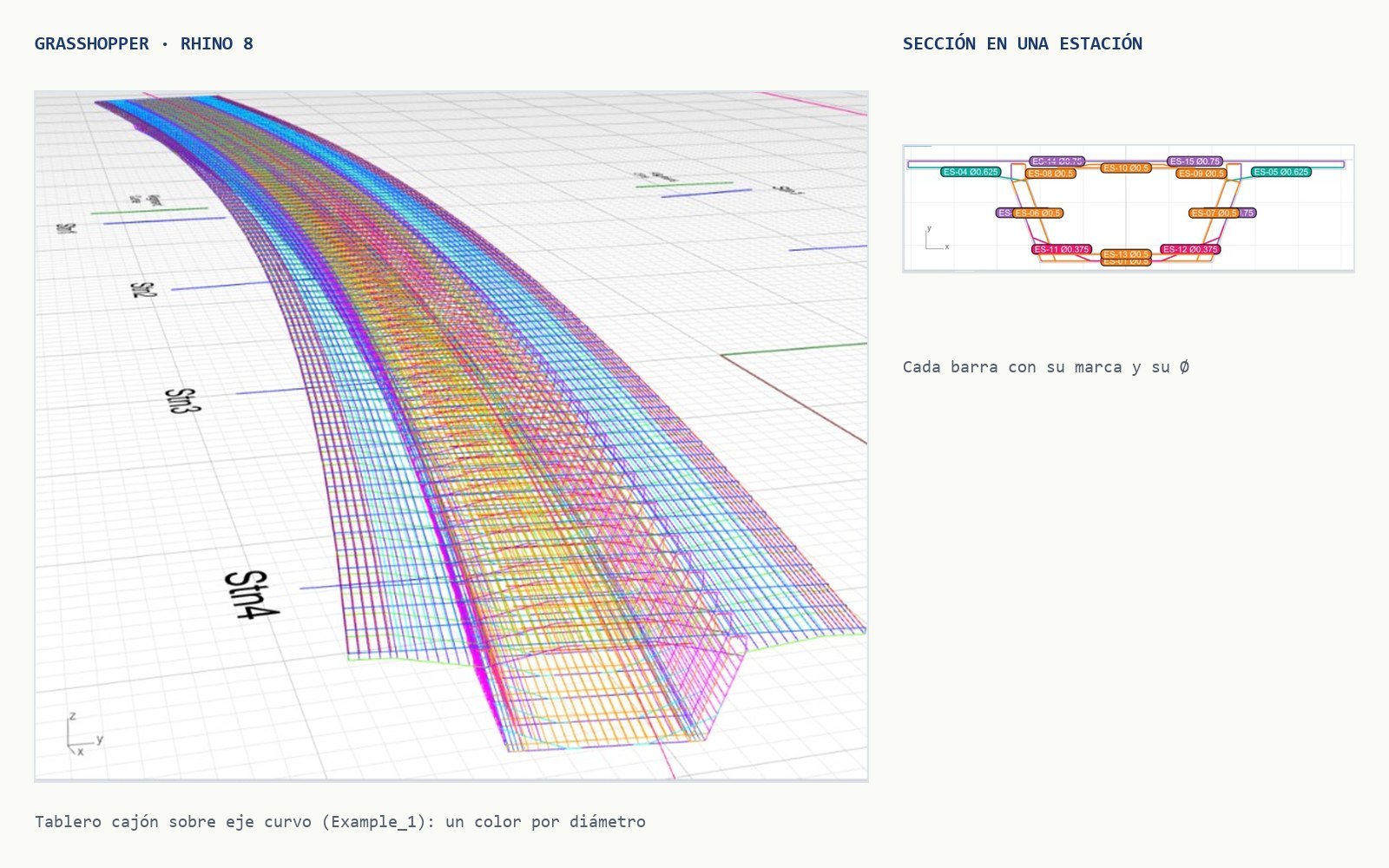
Transversal and longitudinal rebar of a box girder on a curved axis in Rhino, one color per diameter, and the section with the mark and diameter of each bar
03 Rebar

Rebar that understands the geometry.

Transversal reinforcement at every station and longitudinal bars following the axis in 3D, with catalog hooks, rule-based lap splices and bend checks. Every bar comes out with its mark and diameter, not as a loose curve.

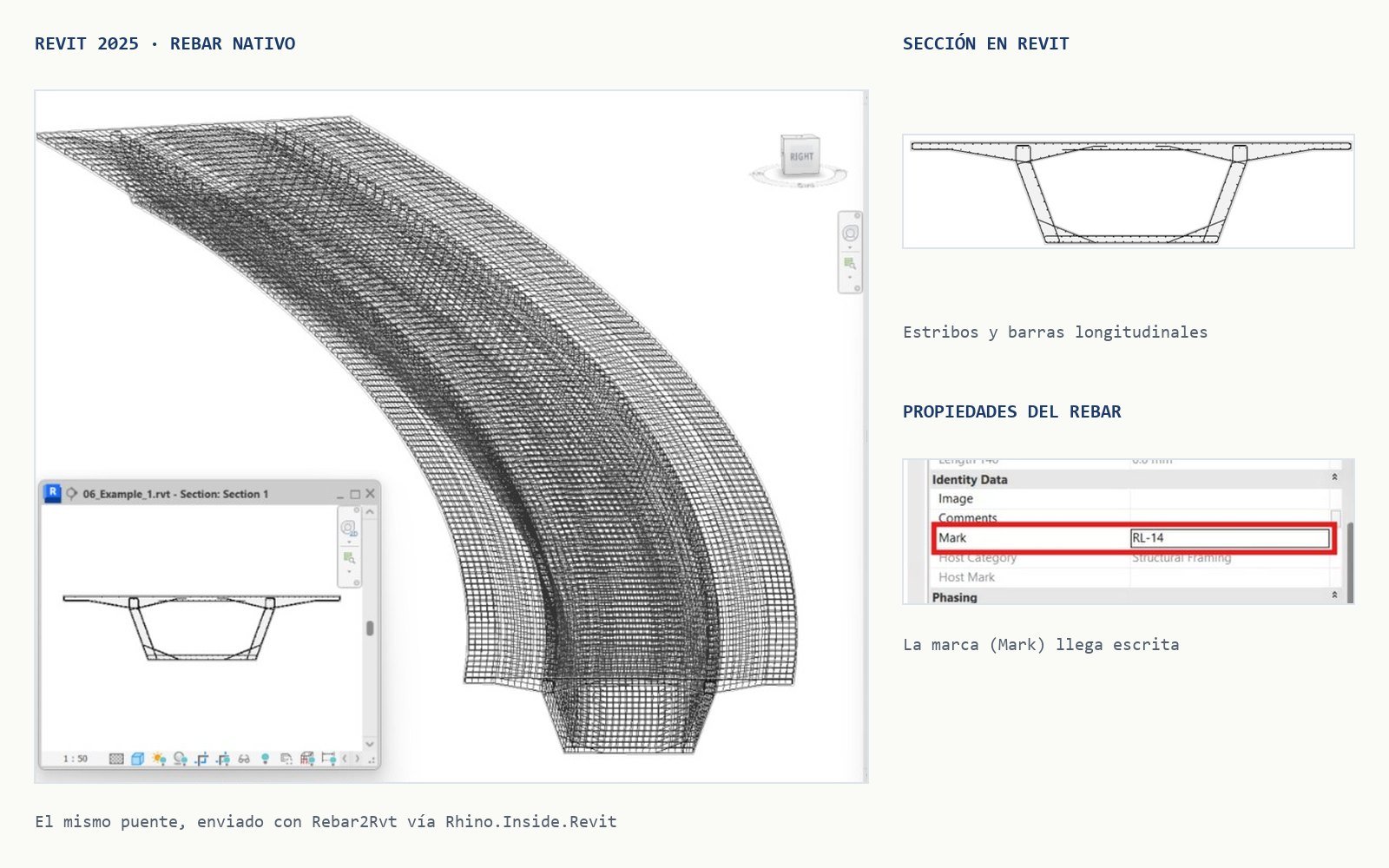
The same bridge in Revit 2025 with the rebar as native Rebar, its section and the mark in the properties
04 Revit

Native Rebar in Revit.

With Rhino.Inside.Revit, the bars reach Revit as real Rebar elements with their mark written. They are grouped by mark, scheduled with Revit tables and updated from Grasshopper.

Included library

13 sections so you never start from scratch.

Each one is a JSON file in millimeters with its variables in plain sight. Open it, change the depth or the number of cells and the section rebuilds. Or draw your own in Rhino.

  1. 01

    Box girder

    One cellTwo cellsThree cellsFour cells

  2. 02

    Post-tensioned box girder

    One cellDeck on two boxes

  3. 03

    Plate girders

    Plate girderDeck on five girders

  4. 04

    Precast pretensioned girders

    Wide-flange girderDeck slab

  5. 05

    Spliced U girder

    U girderSplice girderDeck slab

Components

57 components. One tab: Bridge.

2 · Alignment

6
  • Axis
  • StnCL
  • StnD
  • DivAx
  • DivAxD
  • DeStn

3 · Section

6
  • SecCrv
  • RdSecJ
  • ParamSec
  • SecVars
  • WrSecJ
  • DeSec

4 · Model

4
  • EvalSec
  • SecSwp
  • SecView
  • PlnCut

5 · Transversal

8
  • RbCov
  • RbDef
  • RbStir
  • RbCat
  • RbHook
  • RbSec
  • RbSeam
  • RbView

6 · Longitudinal

8
  • RbLong
  • RbLongN
  • RbLongP
  • RbLongAsm
  • RbSplice
  • RbLongJoin
  • RbArc
  • RbLongView

7 · Tools

9
  • RbBD
  • RbBend
  • RbClash
  • RbNudge
  • RbSplBar
  • RbGroup
  • RbSched
  • DeBar
  • Bake

8 · Revit

2
  • Rebar2Rvt
  • Crv2Rvt

9 · Curves

14
  • CrvAng
  • DiscCrv
  • DivCrv
  • DivCrvN
  • ExtCrv
  • ExtCrv2
  • ExtPtCrv
  • LinePt
  • OrientPl
  • PrjCrv
  • PrjCrv2
  • RebuildCrv
  • RebuildCrvH
  • SplCrv

What each component does, with its inputs and outputs: PDF user guide (Español).

So you know what you get

What it does not do yet

  • Piers and abutments (vertical elements): on the roadmap, with the same engine
  • BVBS export for fabrication
  • Variable superelevation along the axis
  • It does not calculate or design: it generates the geometry and the rebar you define

Requirements

What you need installed

Rhino 8 + Grasshopper
Windows
Revit 2025 + Rhino.Inside.Revit
only to send the rebar to Revit

The software is not included: you need your own Rhino license and, if you use it, a Revit license.

Free license

Free. No accounts. No activation.

GH_Bridge is free. Download it and use it, with nothing to pay or activate. The only things not allowed are selling, modifying or decompiling it.

It comes with the section library and two examples to learn the whole workflow, from the axis to Rebar in Revit. If you want complete bridges already solved, see the kit.

GH_Bridge 1.0.0

Free

Free

Includes

  • GH_Bridge.gha with its 57 components
  • GH_Bridge.Revit to send the rebar to Revit
  • A library of 13 JSON sections
  • Two examples to learn: a box girder with rebar and Revit export, and seven decks from the library

Bridge kit

The plugin is free.
The solved bridge is the work.

Complete end-to-end definitions: section, axis, solid deck, rebar and take-off, wired up and ready to open and adapt to your project. They are the days of setup you save.

It includes a PDF guide (English and Spanish) with each bridge's data, what to learn from it and how to adapt it, plus the GH_Bridge user guide.

  • 01 Curved 3-span bridge 30 + 40 + 30 m, R = 150 m, 2-cell box girder. Solid deck, transversal and longitudinal rebar with staggered laps, true arcs, clash check and steel take-off (24.9 t). Illustrative rebar, not a design
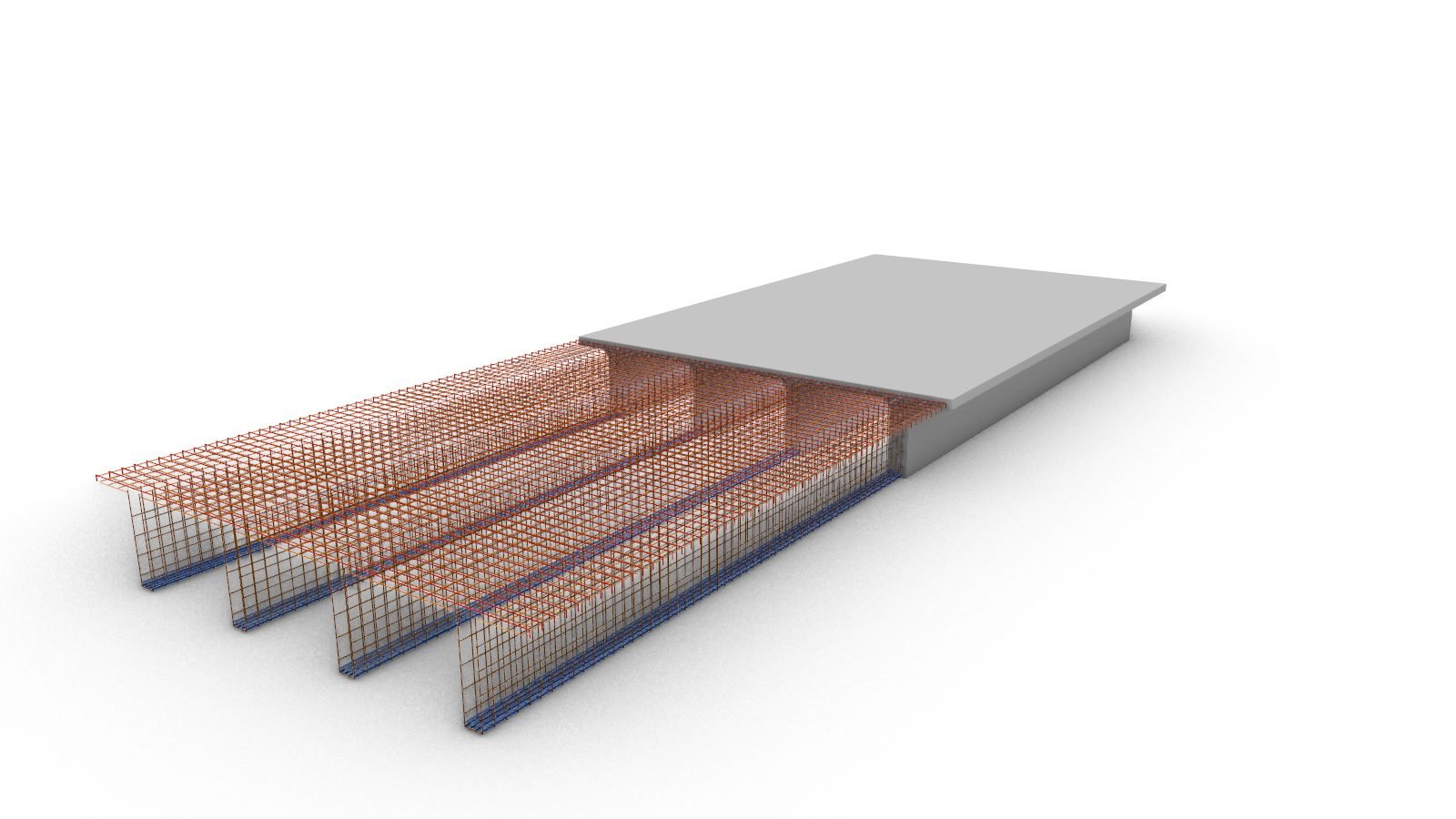
  • 02 25 m T-beam bridge Straight 25 m simple span, 9.00 m deck on 4 T girders (h = 1.70 m), custom JSON section. Transversal and longitudinal rebar with laps, standard colors, clash check and steel take-off (10.9 t). Illustrative rebar, not a design 25 m T-beam bridge: Rhino 8 model with the rebar colored by diameter

GH_Bridge bridge kit

.gh + .json + guide

S/ 39.00

US$ …

In Peru?

You get the download link instantly.

By buying you accept the license terms (ES).

US$ …

Exchange rate applied: S/ … per US$ 1 (SBS selling rate of …, S/ …, plus 5% for the PayPal fee). Price rounded to .99.

Pay in US dollars with PayPal

Loading PayPal…

Questions

Frequently asked questions

Is it really free? +

Yes. GH_Bridge is free. The only paid item is the complete bridge kit, which is optional.

What does the kit have that the plugin does not? +

The free plugin comes with the section library and two examples to learn the workflow, including the export to Revit. The kit adds complete bridges, end to end, ready to open and adapt: it is the work you save, not extra plugin features.

Do I need Revit? +

Not for modeling. The section, axis, solid and rebar are generated in Rhino and Grasshopper. Revit with Rhino.Inside.Revit is only needed if you want the rebar as native Revit Rebar.

Which design codes does it use? +

None automatically: you define covers, diameters, hooks and splice rules. The minimum bend diameter comes with ACI 318-style values that you can replace.

Can I use my own sections? +

Yes. Draw the outline in Rhino (or bring it from a .dwg) and turn it into a section, or write its JSON. The included library is a starting point.

How do I install it? +

Download the free .zip and copy the GH_Bridge folder to the Grasshopper Libraries folder (the INSTALL.txt inside the .zip has the exact paths). The kit, if you buy it, downloads once the payment is confirmed and opens like any .gh file.